OpenClaw配置硅基流动大模型方法

硅基流动提供 20+ 免费大模型,Pro/deepseek-ai/DeepSeek-V3.2也只需要3元/百万Tokens。注册硅基流动就送16元通用券,以deepseek-ai/DeepSeek-V3.2为例,16元相当于300万Tokens:
- 输入 tokens:¥0.002000/ K Tokens
- 输出 tokens:¥0.003000/ K Tokens
除了实惠,选择使用硅基流动还有一个原因:THUDM/GLM-4.1V-9B-Thinking 这款免费模型官方原计划2月9号下线,但我刚好在使用这款模型,提交工单反馈后至今没有下架。可见,硅基流动是很重视用户的。
获取硅基流动 API
API Key 密钥: 硅基流动API Key是以 sk- 开头的字符串。
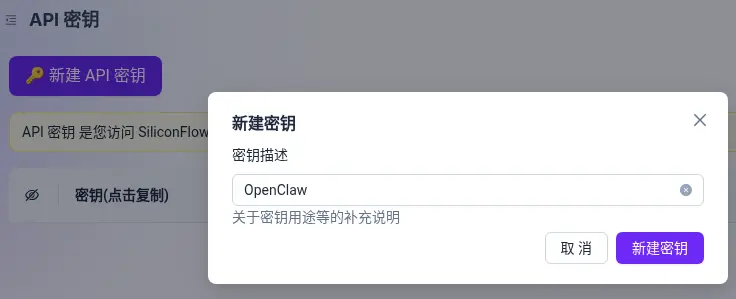
登录硅基流动,在API密钥管理页面新建 API 密钥:
API地址: https://api.siliconflow.cn/v1
模型名称: 在硅基流动模型广场复制完整模型名称。如:deepseek-ai/DeepSeek-V3
配置OpenClaw
编辑openclaw.json:
nano ~/.openclaw/openclaw.json
配置内容如下:
"models": {
    "providers": {
        "siliconflow": {
            "baseUrl": "https://api.siliconflow.cn/v1",
            "apiKey": "${SILICONFLOW_API_KEY}",
            "api": "openai-completions",
            "models": [
                {
                    "id": "Pro/zai-org/GLM-5",
                    "name": "GLM-5",
                    "reasoning": false,
                    "input": [
                        "text"
                    ],
                    "cost": {
                        "input": 6,
                        "output": 22,
                        "cacheRead": 1.5
                    },
                    "contextWindow": 198000,
                    "maxTokens": 8192
                },
                {
                    "id": "Pro/deepseek-ai/DeepSeek-V3.2",
                    "name": "DeepSeek-V3.2",
                    "reasoning": false,
                    "input": [
                        "text"
                    ],
                    "cost": {
                        "input": 2,
                        "output": 3,
                        "cacheRead": 0.2
                    },
                    "contextWindow": 160000,
                    "maxTokens": 8192
                }
            ]
        }
    }
}
如果不想手动编辑配置文件,也可以使用以下命令配置:
openclaw config set models.providers.siliconflow '{
    "baseUrl": "https://api.siliconflow.cn/v1",
    "apiKey": "${SILICONFLOW_API_KEY}",
    "api": "openai-completions",
    "models": [...]
}'
配置环境变量:
nano ~/.openclaw/.env
配置内容如下:
SILICONFLOW_API_KEY="你的API Key"
切换模型(在聊天窗口执行):
/model siliconflow/Pro/zai-org/GLM-5
模型名称拼接说明:
- siliconflow:提供者名称;
- Pro/zai-org/GLM-5:模型Id。
设置硅基流动GLM-5模型为OpenClaw主模型:
openclaw config set agents.defaults.model.primary siliconflow/Pro/zai-org/GLM-5
设置硅基流动DeepSeek-V3.2模型为备用模型:
openclaw config set agents.defaults.model.fallbacks '[
	"siliconflow/Pro/deepseek-ai/DeepSeek-V3.2"
]'
设置模型别名,方便在切换模型时记忆和输入:
openclaw models aliases add glm5 siliconflow/Pro/zai-org/GLM-5
配置文件中内容如下:
"agents": {
    "defaults": {
        "model": {
            "primary": "siliconflow/Pro/zai-org/GLM-5",
            "fallbacks": [
                "siliconflow/Pro/deepseek-ai/DeepSeek-V3.2"
            ]
        },
        "models": {
            "siliconflow/Pro/zai-org/GLM-5": {
                "alias": "glm5"
            },
            "siliconflow/Pro/deepseek-ai/DeepSeek-V3.2": {
                "alias": "deepseek3-2"
            }
        }
    }
}
最后,重启一下OpenClaw网关:
openclaw gateway restart